Let’s learn how to how to add onboarding custom values within minutes!
How To Get Started?
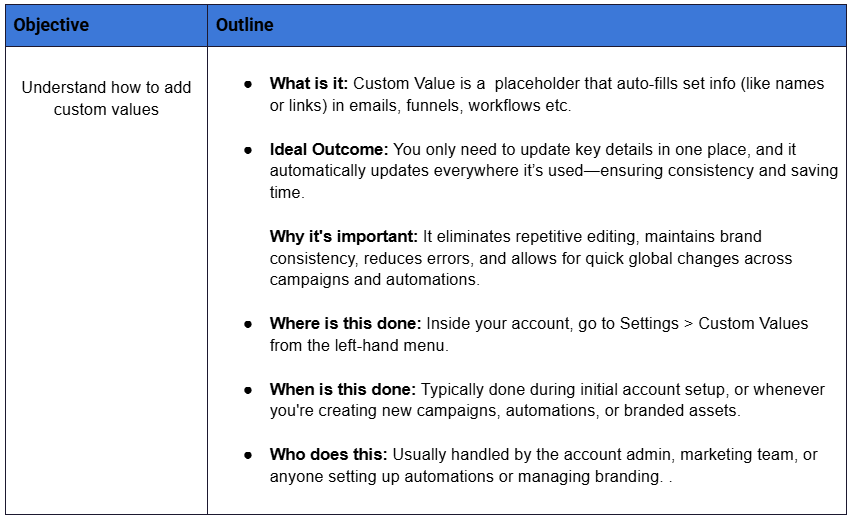
Custom values are essential for a smooth and efficient onboarding process. By filling out the details in the Settings > Custom Values tab, you ensure that all your funnels, emails, SMS, and automations pull the correct info, like your business name, links, or offers, automatically. This saves time, keeps your messaging consistent, and prevents errors across your entire system. Set it up once, and everything just works seamlessly from there.
Standard Operating Procedure
Step by Step Guide
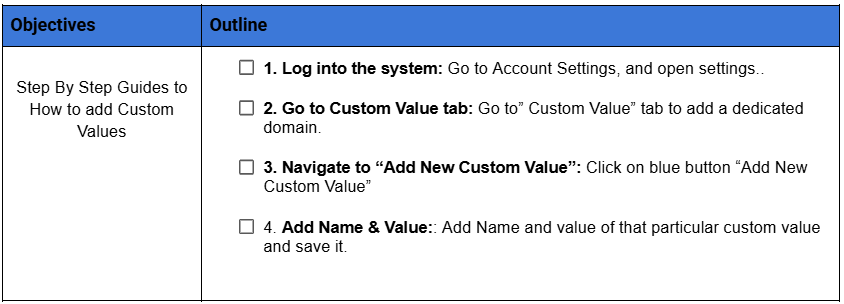
Clear step-by-step instructions on how to get set up
One Last Pro Tip!
Was this article helpful?
That’s Great!
Thank you for your feedback
Sorry! We couldn't be helpful
Thank you for your feedback
Feedback sent
We appreciate your effort and will try to fix the article