Purpose
With increasing carrier restrictions and spam detection filters, it's becoming more difficult to maintain a trusted caller ID. Numbers often appear as "Likely Spam", which drastically reduces pickup rates and damages credibility.
This guide outlines best practices using Twilio, the current most flexible and reliable option, to reduce spam labeling and improve call deliverability through verification and registration steps.
The best way to mitigate “Spam likely is to register a verified number through Twilio.com.
Step 1: Test Phone Numbers Before Purchasing
Use a spam checker to verify a number’s reputation before buying:
https://spamlikely.io/bulk-tester
Paste Twilio number(s) and check spam ratings across major U.S. carriers.
Avoid numbers with high spam scores or flagged histories.
Step 2: Apply for Twilio CNAM Registration (Caller Name)
This allows your business name to appear on outbound calls.
Log into your Twilio Console
Navigate to Trust Hub > CNAM Registration
Submit your business name and the numbers you want to brand
Step 3: Enable SHAKEN/STIR Verification
This step certifies your calls as "verified" to reduce suspicion from carriers.
Go to Twilio Console > Trust Hub
Click SHAKEN/STIR Registration
Add your verified business and numbers
Step 4: Register Numbers with Major Carriers
Twilio enables registration across third-party networks like Hiya, TNS, and First Orion (used by AT&T, T-Mobile, and Verizon).
In Twilio, go to the Trust Hub
Click the "Register Phone Numbers" button
(This submits your numbers to all major spam databases for proper business registration)
You can also click the open new window arrow in the AI dashboard under the “verified” column and register the numbers to major databases.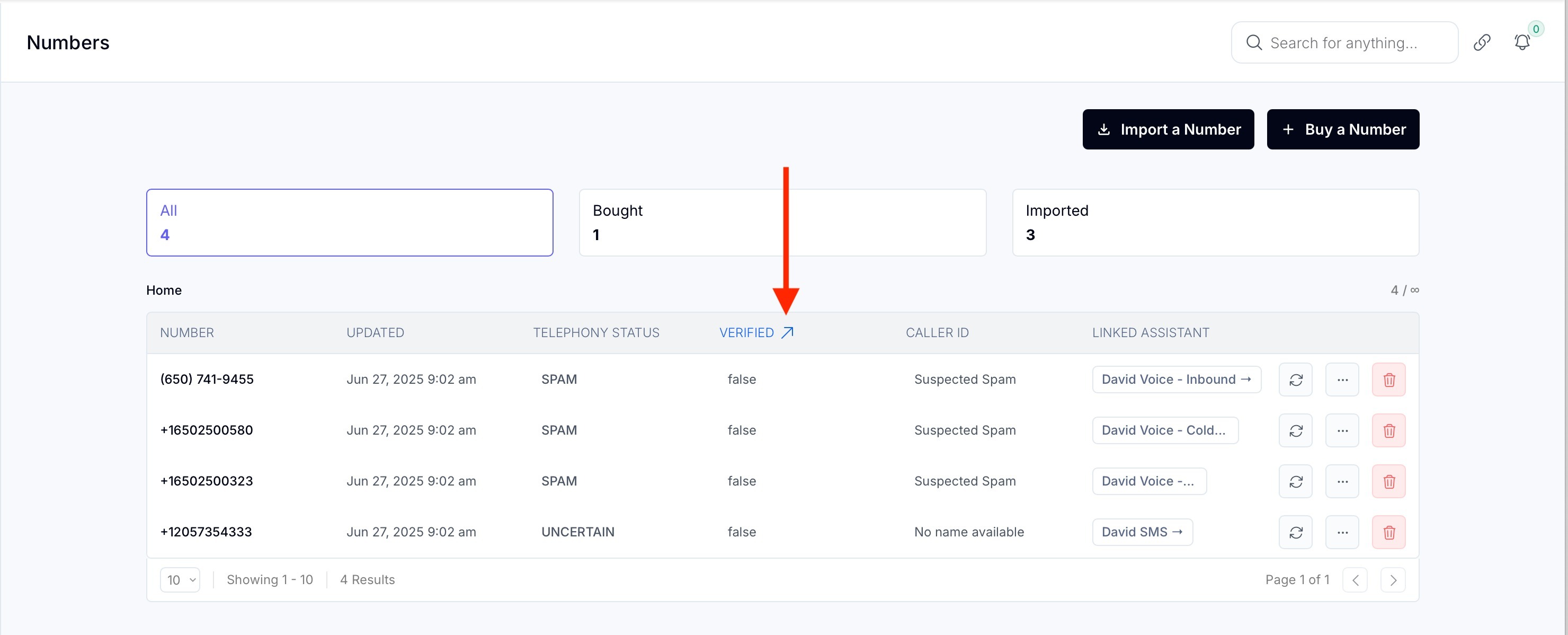
FAQs
Q: Why is my number showing as “Likely Spam”?
A: Carriers use third-party databases to flag unregistered or suspicious numbers. High outbound volume or user reports can also trigger spam labels.
Q: Does Twilio guarantee my number won’t get flagged?
A: No. But Twilio gives you tools like CNAM, STIR/SHAKEN, and carrier registration to greatly reduce the chances of being flagged.
Q: How long does verification take?
A:
CNAM: Usually 3–7 business days
STIR/SHAKEN: 1–3 business days
Carrier registration: Varies, typically up to 7 days
Q: Can I fix a number already marked as spam?
A: Sometimes. Try:
Running it through SpamLikely.io
Re-registering it via Twilio’s Trust Hub
Replacing it with a clean number if it remains flagged
Q: Can I use non-Twilio numbers for this?
A: These strategies are specific to Twilio. Other providers may not offer the same level of registration tools or access to spam control networks.